Operational Efficiency in Cemetery Management: Tools and Best Practices
Quick answer
Operational efficiency in cemetery management means using the right tools and processes to reduce waste, save time, and improve service without sacrificing quality. By digitizing records, automating scheduling, and optimizing maintenance workflows, cemetery owners can cut costs, boost profitability, and provide a better experience for families. Start with small, measurable changes—like mapping plots digitally or standardizing work orders—to see immediate improvements.
Running a cemetery isn’t just about honoring the departed; it’s about managing a complex operation with limited resources. Every minute spent on inefficient processes—like manual record-keeping or last-minute scheduling—is time and money lost. The good news? Small, practical changes can make a big difference. Below, we’ll walk through the tools and best practices that help cemetery owners streamline operations, reduce stress, and improve both service and profitability.
Why Operational Efficiency Matters in Cemetery Management
Cemeteries face unique challenges: limited space, strict regulations, and the emotional weight of serving grieving families. Inefficient operations don’t just drain resources—they can lead to mistakes, delays, and frustration for both staff and visitors. For example:
- A family arrives for a burial, only to find the plot wasn’t prepared on time because of a miscommunication between the office and grounds crew.
- A staff member spends hours manually updating paper records, only to realize later that a plot was double-booked.
- Maintenance tasks pile up because there’s no system to track which areas need attention, leading to overgrown sections or damaged headstones.
These issues aren’t just inconvenient—they can harm your reputation and bottom line. The goal of operational efficiency isn’t to cut corners; it’s to work smarter so you can focus on what matters most: providing dignified, reliable service to families while keeping your business sustainable.
Key Areas to Improve Efficiency
1. Digitize Records and Plot Management
Paper records and hand-drawn maps are error-prone and time-consuming. Digitizing your records—including plot locations, ownership details, and maintenance history—can save hours of work and prevent costly mistakes. Here’s how to start:
- Use a cemetery management software: Tools like CemeteryPro or PlotBox let you store all records in one place, with searchable databases and digital maps. This makes it easy to track plot availability, generate reports, and avoid double-bookings.
- Scan and organize existing documents: If you’re still using paper, start by scanning old records and storing them in a cloud-based system. This ensures backups and makes it easier to share information with staff.
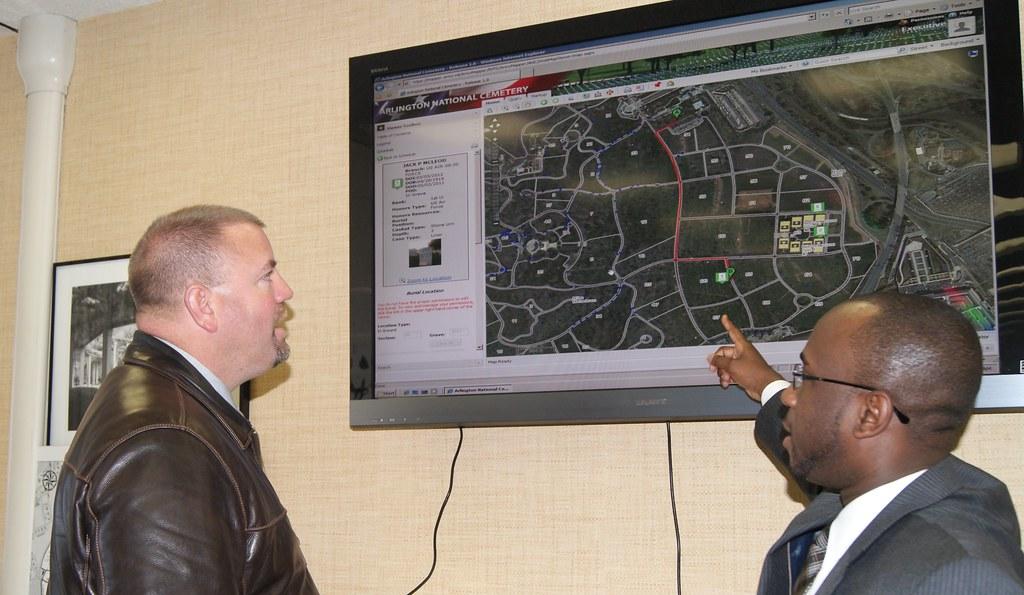
- Create a digital plot map: Even a simple spreadsheet or Google Maps overlay can help staff quickly locate plots and identify available spaces. For a more advanced solution, some software includes GPS mapping to pinpoint exact locations.
Digitizing records isn’t just about technology—it’s about reducing human error and freeing up time for more important tasks. For example, instead of flipping through filing cabinets to confirm plot ownership, staff can pull up the information in seconds.
2. Automate Scheduling and Work Orders
Scheduling burials, maintenance, and staff shifts manually can lead to conflicts, delays, and wasted time. Automating these processes ensures that tasks are assigned efficiently and nothing falls through the cracks. Here’s how to streamline scheduling:
- Use a shared calendar: Tools like Google Calendar or Microsoft Outlook can sync burial schedules, maintenance tasks, and staff shifts in one place. This helps avoid double-booking and ensures everyone is on the same page.
- Implement work order software: Instead of relying on sticky notes or verbal requests, use a system like UpKeep or Fiix to track maintenance tasks. Staff can submit requests digitally, and managers can assign and prioritize them based on urgency.
- Set up automated reminders: For recurring tasks—like mowing, inspections, or seasonal cleanups—use software to send automatic reminders to staff. This reduces the risk of forgotten tasks and keeps the cemetery looking its best.
Automation doesn’t mean replacing human judgment; it means giving your team the tools to work more efficiently. For example, if a burial is scheduled for 10 AM, the system can automatically notify the grounds crew to prepare the plot the day before, ensuring everything is ready on time.
3. Optimize Maintenance Workflows
Maintenance is one of the most labor-intensive aspects of cemetery management. Without a clear system, tasks can pile up, leading to overgrown sections, damaged headstones, or safety hazards. Here’s how to optimize maintenance workflows:
- Create a maintenance checklist: Break down tasks by frequency (daily, weekly, monthly) and assign them to specific staff members. For example:
| Task | Frequency | Assigned To | Notes |
|---|---|---|---|
| Mow lawns | Weekly (spring/summer) | Grounds crew | Focus on high-visibility areas first |
| Inspect headstones | Monthly | Maintenance supervisor | Check for damage or instability |
| Clean pathways | Bi-weekly | Grounds crew | Remove debris and check for trip hazards |
| Seasonal flower planting | Quarterly | Horticulture staff | Coordinate with local nurseries for bulk discounts |
- Prioritize tasks by impact: Not all maintenance tasks are equally urgent. Focus on high-impact areas first, like pathways, entrances, and sections with upcoming burials. For example, if a family is visiting to choose a plot, ensure the surrounding area is well-maintained to make a good impression.
- Use mobile tools for on-site updates: Instead of relying on paper checklists, use a mobile app to log completed tasks in real time. This helps managers track progress and identify bottlenecks.
Optimizing maintenance isn’t just about doing more with less—it’s about ensuring the cemetery is safe, welcoming, and well-maintained for visitors.
4. Standardize Communication with Families
Clear, consistent communication with families is essential for building trust and avoiding misunderstandings. Standardizing your processes can reduce confusion and save time. Here’s how:
- Create templates for common communications: Instead of drafting emails or letters from scratch, use templates for:
- Burial confirmations
- Plot availability updates
- Maintenance requests
- Payment reminders
- Use a customer relationship management (CRM) system: Tools like HubSpot or Zoho CRM can help you track interactions with families, set follow-up reminders, and store important documents in one place.
- Offer online self-service options: Allow families to request information, schedule visits, or make payments through a simple online portal. This reduces phone calls and frees up staff time.
Standardizing communication doesn’t mean losing the personal touch—it means ensuring that every family receives the same level of clarity and professionalism. For example, a template for burial confirmations can include all the necessary details (date, time, location) while still allowing room for a personalized message.
5. Track and Analyze Performance
You can’t improve what you don’t measure. Tracking key performance indicators (KPIs) helps you identify inefficiencies and make data-driven decisions. Here are some metrics to monitor:
- Time spent on tasks: Track how long it takes to complete common tasks, like preparing a plot or updating records. If a task consistently takes longer than expected, look for ways to streamline it.
- Plot occupancy rates: Monitor how quickly plots are being sold or reserved. If certain sections are underutilized, consider adjusting pricing or marketing strategies.
- Customer satisfaction: Collect feedback from families through surveys or follow-up calls. Use this information to identify areas for improvement, like communication or maintenance.
- Maintenance response times: Track how quickly maintenance requests are addressed. Long response times can lead to safety hazards or unhappy visitors.
Use a simple spreadsheet or dashboard to track these metrics over time. For example, if you notice that plot preparation times are increasing, you might invest in better equipment or additional training for staff.
Common Pitfalls and How to Avoid Them
Even with the best intentions, it’s easy to fall into traps that undermine efficiency. Here are some common pitfalls and how to avoid them:
- Overcomplicating processes: Don’t try to implement every tool or system at once. Start with small, manageable changes—like digitizing records or automating scheduling—and build from there.
- Ignoring staff feedback: Your team is on the front lines and may have valuable insights into inefficiencies. Regularly ask for their input and involve them in decision-making.
- Neglecting training: New tools and processes won’t help if staff don’t know how to use them. Invest in training and provide ongoing support to ensure everyone is comfortable with the changes.
- Failing to measure results: Without tracking progress, it’s hard to know if your efforts are paying off. Set clear goals (e.g., “reduce plot preparation time by 20%”) and measure your progress regularly.
Efficiency isn’t a one-time project—it’s an ongoing process of refinement. By staying flexible and open to feedback, you can continue to improve over time.
Who This Approach Is For (and Who It’s Not For)
Operational efficiency isn’t a one-size-fits-all solution. This approach is ideal for:
- Small to mid-sized cemetery owners who want to reduce waste, save time, and improve service without a massive upfront investment.
- Managers looking to modernize outdated processes, like paper records or manual scheduling, to keep up with industry standards.
- Teams struggling with communication gaps between the office and grounds crew, leading to delays or mistakes.
- Owners who want to increase profitability by cutting unnecessary costs and optimizing workflows.
However, this approach may not be the best fit for:
- Very small cemeteries with minimal staff, where processes are already simple and efficient.
- Owners resistant to change, who prefer to stick with traditional methods even if they’re inefficient.
- Cemeteries with severe budget constraints, where even small investments in tools or training aren’t feasible.
If you’re unsure whether operational efficiency is right for your cemetery, start with a small pilot project—like digitizing records for one section—and measure the results. If it works, you can expand from there.
For those ready to take the next step, Run Your Cemetery Like a Business: The Modern Owner’s Guide to Profit and Growth offers a comprehensive roadmap for implementing these strategies and more. The ebook covers everything from financial planning to marketing, with actionable steps tailored to cemetery owners.
Next Steps: How to Get Started
Improving operational efficiency doesn’t have to be overwhelming. Here’s a simple roadmap to get started:
- Assess your current processes: Identify the biggest inefficiencies in your cemetery. Are records disorganized? Is scheduling chaotic? Are maintenance tasks falling through the cracks?
- Pick one area to improve: Focus on the low-hanging fruit—like digitizing records or automating scheduling—that will have the biggest impact with the least effort.
- Research tools and solutions: Look for software or systems that fit your budget and needs. Many tools offer free trials, so you can test them before committing.
- Implement and train: Roll out the new tool or process with your team, and provide training to ensure everyone is comfortable with the changes.
- Measure and refine: Track your progress and adjust as needed. If something isn’t working, don’t be afraid to pivot and try a different approach.
For example, if you decide to digitize your records, start by scanning and organizing the most frequently accessed documents—like plot ownership records or burial permits. Once that’s done, you can move on to less critical files. Small steps add up to big improvements over time.
If you’re looking for a more structured approach, Run Your Cemetery Like a Business provides a step-by-step guide to implementing these changes, with templates, checklists, and real-world examples to help you succeed.
Frequently Asked Questions
What is operational efficiency in cemetery management?
Operational efficiency in cemetery management means using tools and processes to reduce waste, save time, and improve service. This includes digitizing records, automating scheduling, optimizing maintenance workflows, and standardizing communication with families. The goal is to work smarter, not harder, so you can provide better service while keeping costs under control.
How can I improve efficiency in a small cemetery with limited staff?
Start with small, high-impact changes that don’t require a lot of resources. For example:
- Digitize records using a simple spreadsheet or free cloud storage.
- Use a shared calendar (like Google Calendar) to track burials and maintenance tasks.
- Create a checklist for daily, weekly, and monthly tasks to ensure nothing is overlooked.
- Standardize communication with families using email templates for common requests.
Even small changes can make a big difference in reducing stress and improving service.
What are the best tools for cemetery management?
The best tools depend on your specific needs and budget. Here are some options to consider:
- Cemetery management software: Tools like CemeteryPro or PlotBox offer features like digital plot maps, record-keeping, and reporting.
- Work order software: Systems like UpKeep or Fiix help track maintenance tasks and assign them to staff.
- CRM tools: Platforms like HubSpot or Zoho CRM can help you manage interactions with families and track important documents.
- Scheduling tools: Google Calendar or Microsoft Outlook can sync burial schedules, maintenance tasks, and staff shifts in one place.
Start with one tool that addresses your biggest pain point, and expand from there.
How do I measure the success of operational efficiency improvements?
Track key performance indicators (KPIs) to measure the impact of your changes. Some metrics to monitor include:
- Time spent on tasks (e.g., plot preparation, record updates).
- Plot occupancy rates and sales trends.
- Customer satisfaction scores from surveys or feedback.
- Maintenance response times and completion rates.
Use a simple spreadsheet or dashboard to track these metrics over time. For example, if you digitize your records, measure how much time you save on tasks like searching for plot ownership details or updating burial permits.
What are the biggest challenges in improving cemetery operations?
The biggest challenges often include:
- Resistance to change: Staff may be hesitant to adopt new tools or processes, especially if they’re used to traditional methods. Involve them in the decision-making process and provide training to ease the transition.
- Budget constraints: Investing in new tools or software can be daunting, especially for small cemeteries. Start with low-cost or free solutions, and prioritize changes that offer the biggest return on investment.
- Lack of time: Improving efficiency takes time, and it can be hard to find the bandwidth to implement changes. Start small, and focus on one area at a time to avoid feeling overwhelmed.
- Regulatory compliance: Cemeteries are subject to strict regulations, and any changes to processes must comply with local laws. Consult with legal or industry experts to ensure your improvements meet all requirements.
By addressing these challenges head-on, you can make steady progress toward a more efficient operation.
How can I balance efficiency with the emotional needs of families?
Operational efficiency isn’t about cutting corners—it’s about freeing up time and resources to focus on what matters most: serving families with care and dignity. Here’s how to strike the right balance:
- Automate administrative tasks: Use tools to handle scheduling, record-keeping, and communication, so you can spend more time with families during their visits.
- Standardize processes, not interactions: Templates and checklists can help ensure consistency in service, but always leave room for personalization when interacting with families.
- Train staff on empathy: Efficiency tools should support—not replace—compassionate service. Ensure your team understands the importance of listening, patience, and respect when working with grieving families.
- Gather feedback: Regularly ask families for input on their experience. Use this feedback to refine your processes and ensure they meet both operational and emotional needs.
For example, while a digital scheduling system can ensure burials are prepared on time, it’s still important to personally walk families through the process and answer their questions with patience and care. Run Your Cemetery Like a Business includes strategies for balancing efficiency with compassionate service, helping you create a sustainable operation that honors both your business and your community.
Ready to take your cemetery’s operations to the next level? Start with one small change today, and build from there. For a comprehensive guide to modernizing your cemetery, check out Run Your Cemetery Like a Business: The Modern Owner’s Guide to Profit and Growth.
Related guides
For the next practical step, explore these related guides:
Make Your Business Online By The Best No—Code & No—Plugin Solution In The Market.
30 Day Money-Back Guarantee
Say goodbye to your low online sales rate!
What is operational efficiency in cemetery management?
Operational efficiency in cemetery management means using tools and processes to reduce waste, save time, and improve service. This includes digitizing records, automating scheduling, optimizing maintenance workflows, and standardizing communication with families. The goal is to work smarter, not harder, so you can provide better service while keeping costs under control.
How can I improve efficiency in a small cemetery with limited staff?
Start with small, high-impact changes that don’t require a lot of resources. For example, digitize records using a simple spreadsheet or free cloud storage, use a shared calendar to track burials and maintenance tasks, create a checklist for daily and weekly tasks, and standardize communication with families using email templates.
What are the best tools for cemetery management?
The best tools depend on your specific needs and budget. Consider cemetery management software like CemeteryPro or PlotBox for digital records and maps, work order software like UpKeep or Fiix for maintenance tracking, CRM tools like HubSpot or Zoho CRM for family interactions, and scheduling tools like Google Calendar or Microsoft Outlook for burials and staff shifts.
How do I measure the success of operational efficiency improvements?
Track key performance indicators (KPIs) such as time spent on tasks, plot occupancy rates, customer satisfaction scores, and maintenance response times. Use a spreadsheet or dashboard to monitor these metrics over time and adjust your processes as needed.
What are the biggest challenges in improving cemetery operations?
Common challenges include resistance to change, budget constraints, lack of time, and regulatory compliance. Address these by involving staff in decisions, starting with low-cost solutions, focusing on one area at a time, and consulting experts to ensure compliance with local laws.
How can I balance efficiency with the emotional needs of families?
Automate administrative tasks to free up time for personal interactions, standardize processes but leave room for personalization, train staff on empathy, and gather feedback from families to refine your approach. Efficiency tools should support—not replace—compassionate service.